
- AuthorPosts
- June 8, 2013 at 18:07 #1474
 RattusKeymaster
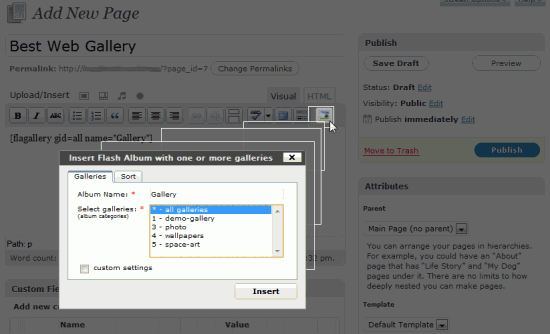
Go to your post/page and insert shortcode tag easy with Flagallery button:

Insert shortcode
[[flagallery gid=all name=Gallery]]
There are few places where you can find Flagallery button:
* Flagallery link in Upload/Insert section
* Flagallery icon in Visual Editor
* Flagallery button in HTML EditorAdditional shortcode parameters
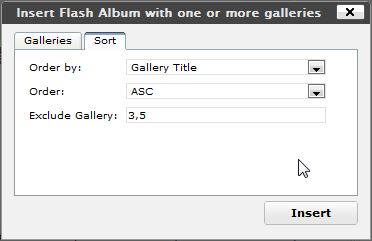
If you want to show all your galleries in single skin, then there are few additional shortcode parameters available for you:
[[flagallery gid=all orderby=title order=ASC exclude=3,5 name=Gallery]]

Insert shortcode with custom sort options
This shortcode will display all galleries (except ID=3 and ID=5) sorted by title, ASC order.
Specific order of galleries
Wanna display galleries in specific order? No problem:
[[flagallery gid=4,2,5 name=Gallery]]
Above shortcode will display first gallery with ID=4, then with ID=2 and ID=5 in flash categories.
Alternatively you can create Album on Manage Galleries page -> drag’n’drop galleries to Album in order you want -> Save.
Then insert shortcode by choosing album (in Flagallery popup choose Album tab -> select album you want and click Insert):[[flagallery album=1 name=Gallery]]
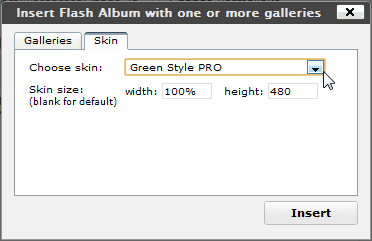
Custom skin parameters in shortcode
If you do not insert skin parameter in shortcode, then skin activated by default will be used for this shortcode. The value of skin parameter is skin’s folder name.
[[flagallery gid=3,4,5 w=100% h=480 skin=minima_jn name="My Wedding"]]
Shortcode custom settings
Play music in gallery
Note, that only Optima Skin support music playlist. All other skins will ignore playlist parameter. If you’ve created music playlist on Music Box page, then you can play it in your image gallery.
While inserting shortcode (in Flagallery popup) choose Music tab and select playlist name to be inserted in shortcode.[[flagallery gid=4 skin=optima_jn playlist=sounds-of-nature name=Gallery]]
October 10, 2017 at 19:41 #10121AnonymousInactiveWhich type of HTML version you using? I’m newbie and want to create own website, like this, where students and schoolers can order homeworks. What you think about it?
- AuthorPosts


- The forum ‘Installation and Usage’ is closed to new topics and replies.