• Link to X
  • Link to Rss this site
  • Log In / Sign In
CodEasily.com
  • Demo
  • How To
  • Contact
  • About Author
  • Click to open the search input field Click to open the search input field Search
  • Menu Menu

I cant edit images

You are here: Home1 / Forums2 / Gmedia Gallery WordPress Plugin3 / Troubleshooting4 / I cant edit images5
Viewing 9 posts - 1 through 9 (of 9 total)
  • Author
    Posts
  • July 26, 2015 at 18:08 #5304
    Daniel
    Participant

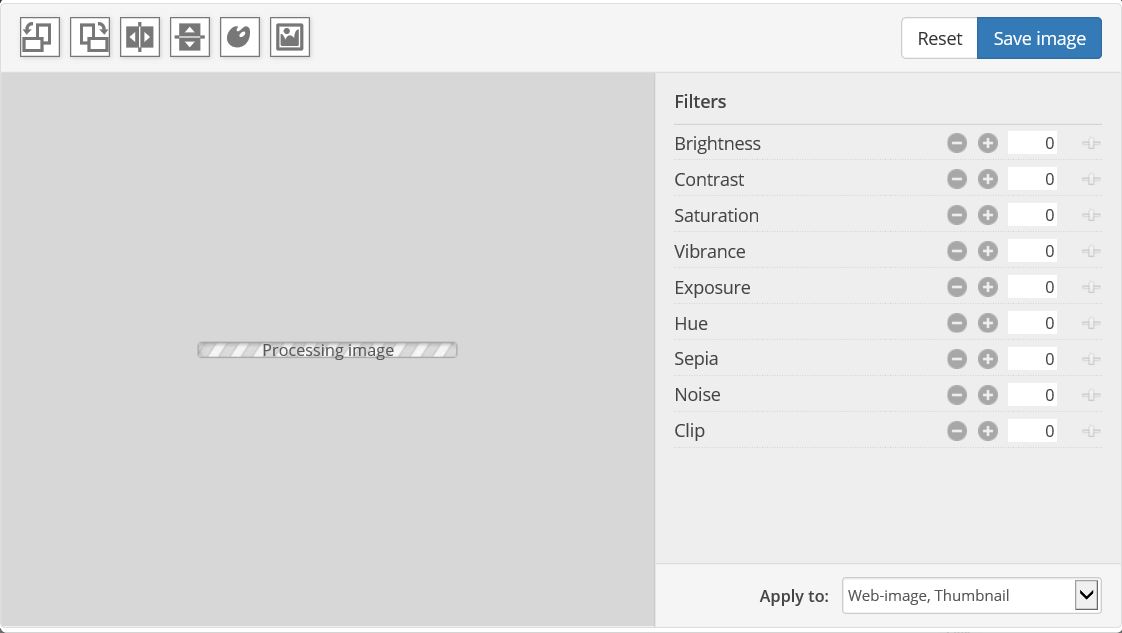
    When I click on “Edit image”, window with “processing image” is opened and it is all.
    Edit_image
    What can I do with this?

    July 26, 2015 at 20:30 #5308
    Rattus
    Keymaster

    It tries to load original image.
    Be sure that original image exists (in ‘wp-content/grand-media/image/original/’ folder).
    Be sure you have enough PHP Memory limit (check on small images).
    Check if there are no any javascript errors on the page.

    July 28, 2015 at 16:22 #5319
    Werner
    Participant

    I have the same Problem. My PHP Memory is 128 MB and the Usage ist 27%.
    Is it necessary that a folder for the Picture-Editor is available and the create
    of the folder connot do automatically. Than i can do this manually.

    July 28, 2015 at 22:49 #5338
    Rattus
    Keymaster

    I need temporary access to WordPress admin to see what’s happens, so I can try to solve the problem.

    July 29, 2015 at 19:04 #5346
    Daniel
    Participant
    This reply has been marked as private.
    July 29, 2015 at 22:52 #5347
    Rattus
    Keymaster

    Fixed. Seems like Image Editor not worked if site domain name have hyphen. Also added this fix to Gmedia v1.7.2, so who have the same problem just update plugin to latest version.

    July 30, 2015 at 07:18 #5351
    Daniel
    Participant

    Thank you very much, image is showed in edit window now.
    But I have still problem, when I try edit picture. For example I try rotate pics and what I see is only white place. And When I use save, black image is saved. I can restore original pic, it is OK.
    Thanks.

    July 30, 2015 at 13:07 #5352
    Rattus
    Keymaster

    I’ve just tried rotate few photos on your website and it works for me fine.

    August 2, 2015 at 09:43 #5364
    Daniel
    Participant

    Thank you for your answer. I tried it again in firefox, but still nothing. Explorer and Edge same reason. But when I tried it in chrome, it works perfect. It is enough for me. Thank you very much.

  • Author
    Posts
Viewing 9 posts - 1 through 9 (of 9 total)
  • The forum ‘Troubleshooting’ is closed to new topics and replies.
Forum closed. Use forum at Wordpress.org: Gmedia Support Forum

Search Forums

Recent Topics

  • HIde the pop out function and button
  • Backup and Restore Gmedia Albums, Galleries and Photos
  • Automating Imports from WP media Library to GMedia Library
  • Gmedia plugin missing from wordpress menu. Gmedia id=7
  • don't get lightboxes
  • Next Prev buttons jumping
  • Build Query doesn't work
  • Mosiac displaying descriptions when hovering
  • WordPress plugins are not updated despite confirmation email
  • Send value of object to gmedia_meta table specific column in table

See It In Action

  • Cubik – 3D Cube Module for Gmedia GalleryNovember 23, 2016 - 21:41
  • Gmedia Gallery – Phantom Pro ModuleAugust 23, 2016 - 20:56
  • Gmedia Gallery – WaveSurfer ModuleAugust 2, 2016 - 18:59
  • Gmedia Gallery – PhotoTravlr ModuleJune 14, 2016 - 11:37
  • Gmedia PhotoManiaJune 22, 2015 - 20:49
  • Gmedia Gallery – Mosaic ModuleMarch 7, 2015 - 17:50
  • Gmedia Gallery – RealSlider ModuleJuly 8, 2014 - 20:43
  • Gmedia – Music PlayerSeptember 9, 2013 - 23:49
  • Gmedia Gallery – PhotoBox ModuleAugust 28, 2013 - 23:22
  • Gmedia Gallery – Phantom ModuleJune 20, 2013 - 22:25
© Copyright - CodEasily.com
  • Link to X
  • Link to Rss this site
  • Privacy Policy
  • Terms
  • Contact
Scroll to top Scroll to top Scroll to top